About the project
Pocket Dev is free and open source. It lets you control your own computer from your phone's browser: terminals, Claude Code and Codex chats, Git, files, open apps and power. It runs on your machine, nothing is installed on the phone, and there is no cloud account.
Pocket Dev runs on the computer where your work already lives and opens in your phone's browser. Start a real terminal, continue a coding conversation, review a diff, commit and push, or move a file while you are away from your desk. Nothing is installed on the phone, and there is no Pocket Dev cloud account.
Chat uses your existing Claude Code and Codex logins. One Chats list shows Pocket Dev chats and the conversations on your computer together, newest first. Open a conversation the computer still has open and the phone reads along live; send a message and it continues on the phone. You can review tool approvals and file changes, copy any message, see when each was sent, or switch engines in the same chat when one hits a usage limit. Pocket Dev preserves its own conversation history and passes that context to the next engine. Google Antigravity CLI is also available experimentally through ACP, with separate limits documented in the roadmap.
One phone can switch between several computers in a local room, with permissions set per device. Wi-Fi works on its own; optional internet access uses a Cloudflare Tunnel and is off by default. Project invitations let a Viewer read scoped files or a Developer edit a separate copy, without opening the owner's terminals and chats.
It is published on npm for macOS, Windows 11 and Linux. The guided setup checks for updates, explains the changes it proposes and asks before installing optional tools or changing service settings. The product videos and testing with the first 10 users are complete. My current focus is the public launch and marketing Pocket Dev to more developers.
The README and docs on this site are read from the public GitHub repository and refreshed about once an hour. They cover installation, permissions, troubleshooting, the tested platform limits and the roadmap.
Let your AI help you set it up
Paste the prompt into a coding assistant running on your computer.
Paste this into a coding assistant that can run terminal commands on your computer.
View prompt
Read and get it
How it works
Install
On a computer with Node.js 22 or newer, run npm install -g @anisirji/pocket-dev, or try it once with npx.
Set up
Run pocket-dev start. On the first run, a guided setup shows what it will do and asks before each change. It finishes with the Wi-Fi address and a one-time login QR code.
Connect your phone
Scan the QR code on the same Wi-Fi, or open the address and use the password. If the computer asks, allow Pocket Dev through the firewall.
Work
Use terminals, Chat, Git, Files and the open-apps and power controls from the phone.
Add more computers
Join several computers into a room and switch between them from one phone.
Connect from away
Optionally enable a Quick link or your own domain through Cloudflare Tunnel from the computer's Admin page. Link the phone before leaving Wi-Fi.
Under the hood
- Terminals
- Real shells through node-pty, recent output replay on reconnect and a separate terminal host that keeps supported sessions running through server updates. A computer restart still ends them.
- Chat
- Streaming answers, approval cards, file diffs, queued messages, a copy icon and the time on every message, read-along handoff from the computer, and switching providers and models in the same chat. Claude Code and Codex use your existing logins; Antigravity and GitHub Copilot are experimental.
- Git and Files
- Branch history, diffs, commits, push, stashes and GitHub pull requests, plus uploads (with Take photo on phones), downloads and sandboxed previews of files on your computer, including PDFs and text from Messages.
- Rooms and sharing
- Switch among local computers, share tasks and messages, and control permissions per device. Collaborator file access uses scoped project copies; collaborator AI is not available yet.
- Computer controls
- Open apps, system health, keep-awake and power controls. Availability varies by operating system. Screen view is a read-only picture, rather than remote mouse control.
- Access and Admin
- A computer-only Admin page manages devices, login approval, one-time QR codes, internet access, the service and lockdown. Optional remote access uses HTTPS through Cloudflare Tunnel.
What I did
- Built it end to end and published it to npm as @anisirji/pocket-dev
- Support for macOS, Windows 11 and Linux, with one install page for each, and a beginner guide with pictures
- A doctor command that checks Node, the terminal parts, tools and the port, and prints the fix for each problem
- Rooms, so one phone can switch between several computers
- Built streaming coding chats with approvals, conversation handoff and context transfer between Claude Code, Codex and experimental Antigravity
- Separated the terminal host from the web server so supported terminals can survive server updates
- Added scoped collaborator project copies, device approval, security logs and optional internet access
- Created demo and launch videos, completed testing with the first 10 users, and started work on the public launch and marketing
Problems I hit, and how I fixed them
A different npm package called pocket-dev can take over the command.
Fix The README tells people to install @anisirji/pocket-dev exactly and how to uninstall the other one.
A web-server update could kill the shells people were still using.
Fix Moved terminals into a separate host and replay recent output when the browser reconnects.
A coding engine can hit its usage limit while a conversation is unfinished.
Fix Keep a Pocket Dev copy of the conversation and pass its context to another installed engine. Long histories are summarized for the transfer, while the full history stays on the computer.
Screenshots
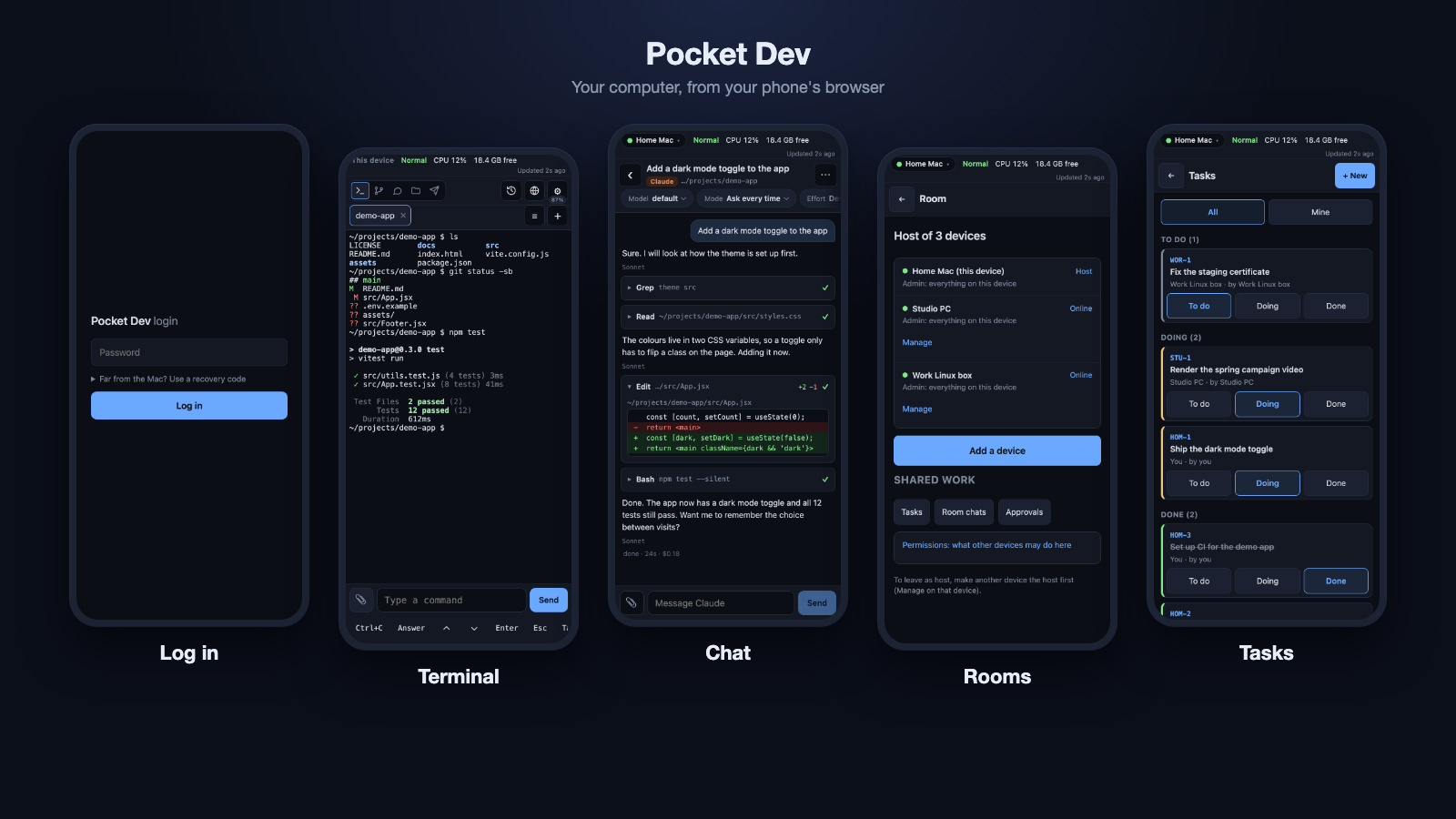
Log in, Terminal, Chat, Rooms and Tasks, shown with demo data
To be clear
It is new: the first commit is from 6 November 2026. The docs record real Windows testing, but Linux has not been tested on a real machine. Antigravity was manually tested on macOS with CLI 1.5.9; other systems and versions remain unverified, and its third-party-use terms need review. Collaborator AI, passkeys, an Android share target and rooms over the internet are not built. The walkthrough uses demo data and a simulated installation terminal.
A little more freedom
If Pocket Dev helps you step away from your desk, pass it on to three people. No pressure. ❤️